
Blog SEO Checklist: 15 Steps to Optimise Every Post
When I started writing blogs for my business, I became obsessed with optimisation strategies. I read every Google update, I learned all the optimisation “hacks”, and I tried just about everything to get my blogs to rank higher.
Some of it was incredibly useful, some of it was complete nonsense. But eventually, I figured out the strategies that actually move the needle. The ones that truly make your posts a top priority for the algorithm.
And fortunately for you, it’s not as complicated as it seems, and you don’t need to read every Google algorithm update (unless you’re a massive nerd like me) to show up on the first page of Google.
In this post, I’ve distilled everything I’ve learned about blog SEO to give you an easy, repeatable blog SEO checklist you can apply to each post you publish to get it ranking higher.
DIYing your website copy & SEO doesn’t have to be overwhelming.
The Website Growth System walks you through how to write high-converting copy and optimise your entire website so you can confidently boost traffic, inquiries, and sales. Packed with templates, copywriting scripts, and tutorials, it’s everything you need to make your website shine on a budget.
Blog SEO Checklist to Rank Higher on Google
1. Start With the Right Keyword & Intent
Before you write a single word:
Choose a primary keyword
Add 1-2 supporting keywords
Your goal is to match the type of content Google already rewards. I use UberSuggest to find keywords that have decent monthly traffic (100+ searches) and a competition score below 40. Those are the easiest ones to rank for.
This is the single most important point in this blog SEO checklist. If you try to compete for highly competitive keywords, you’ll end up on page 412 of Google. And if you choose super obscure keywords, there won’t be enough interest to generate traffic.
Here’s a blog I wrote for a client that showed up third organically on Google after just a couple of weeks:
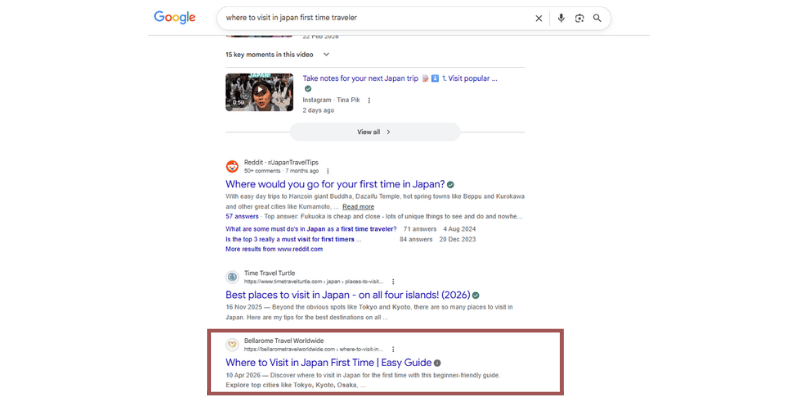
The most important factor here was choosing a low-competition keyword with decent monthly traffic.
Related: Your Complete Website Audit Checklist
2. Optimise Your Blog Title (H1)
Your title should:
Include your primary keyword
Be clear, not clever
Promise a specific outcome
Example: Blog SEO Checklist: 15 Steps to Optimise Every Post
Keep it short and sweet, and add your keyword as close to the beginning as you can.
3. Write a Strong, Keyword-Rich Introduction
Mention your primary keyword naturally
Reinforce what the post will help with
Keep it tight (no rambling)
This helps both rankings and keeps people reading. Although we’re optimising your post for Google with this blog SEO checklist, your human readers should always come first in your content marketing strategy.
4. Use a Clear Heading Structure (H2, H3)
Break your content into sections:
H2s = main steps
H3s = supporting points
This improves readability and helps Google understand your content structure. Remember, people skim. Most of your readers will skip down the post and look for headings that are most relevant to them. You’re skimming right now, right?
If you have massive chunks of text with no headings breaking it up, Google won’t be able to crawl it properly and readers will get bored.
5. Optimise Your URL (Slug)
Keep it:
Short
Keyword-focused
Example: /blog-seo-checklist
No dates, no filler words, no clutter. If it makes sense to only use your keyword, that’s perfect. The shorter the better for SEO.
6. Write a Compelling Meta Title & Description
This is the title and description that shows up on Google searches. They don’t directly rank your content, but they do impact clicks.
Meta title: include keyword + benefit
Meta description: make it click-worthy
I usually use my H1 blog title for the Meta title. But if my actual title is a little long, I’ll sharpen it for the meta title.
Google generates its own meta description about 75% of the time, but you still need one to help it crawl your post and understand the content.
Related: Why Smart Websites Treat the Footer Like Prime Real Estate
7. Use Your Keyword Naturally (Not Aggressively)
Place your keyword in:
Title (H1)
First 100 words
At least one H2
A few times throughout (aim for a 2% density: 2 keywords per 100 words)
But don’t force it. Google’s smarter than that now, and it can immediately tell if you’re stuffing keywords just for rankings.
Google is incredibly good at reading the context of your post. So the more naturally you use keywords, the better.
8. Optimise Images (Alt Text + File Names)
For every image:
Use descriptive file names (blog-seo-checklist.png)
Add alt text with context
This helps with accessibility and boosts image SEO. Again, don’t just add your keyword to your ALT text and call it a day. Give a genuine description of the image and naturally incorporate your keyword.
9. Add Internal Links
Link to:
Related blog posts
Relevant service pages
Use descriptive anchor text (not “click here”). This helps Google crawl your site and understand topic relationships.
I like to use the target page’s keyword as the anchor text. This makes it super easy for Google to crawl and understand the context of the page.
10. Include External Links (When Relevant)
Link out to:
Credible sources and high-authority websites
Supporting data
This builds trust and context around your content. If you link to high-authority websites, it’s a small signal that your website is also high-authority.
Related: How to Earn High-Authority Backlinks (Without Paying for Them)
11. Make Your Content Genuinely Useful
This is the big one on our blog SEO checklist. Your post should:
Answer the search query fully
Be easy to follow
Avoid fluff
If your website copy is better than what’s ranking, you earn your spot. Thin content that’s only written to snag traffic won’t organically rank high on Google. The algorithms are far too smart for that now.
12. Format for Readability
Short paragraphs
Plenty of spacing
Bullet points where helpful
Because if people bounce, rankings drop. And now our attention spans are smaller than ever, people want scannable content that’s easy to digest.
13. Check Mobile Experience
About 62% of readers are visiting your website on mobile:
Is it easy to read?
Are sections too long?
Does it feel cramped?
Mobile experience is a massive ranking signal for Google. If your website isn’t optimised for small screens, it won’t rank in searches.
14. Add an FAQ section
At the end of your blog, add an accordion-style FAQ section that answers the most common questions on the topic.
I like to use Google’s “People Also Asked” to find questions to add. This gives an easy SEO boost and helps you show up in AI snippets.
15. Improve Page Speed
Compress images
Avoid heavy, unnecessary elements and animations
I like to use Pingdom to check page load speed. It’s free, and gives your website a score and tips on how to fix issues.
You don’t need a perfect load speed, but anything over 3-4 seconds is going to reduce your SEO and make potential visitors bounce.
16. Make Sure Your Post Can Be Indexed
Here are the quick checks to make sure your blog post is actually indexable in your Google Search Console:
Page isn’t set to noindex (you can check this with the URL inspection tool).
Sitemap includes it (check the “discovered URLs” in your sitemap).
Once your blog is live, use the URL inspection bar at the top to request indexing.
Google will index your blog eventually without being told to, but it takes longer. And your post can’t show up in searches without being indexed.
Ready to Take This Blog SEO Checklist to the Next Level?
A solid blog SEO checklist doesn’t have to be overly complicated. You just need to do the right things, consistently. When your content is clear and built around what people are actually searching for, your blogs will start climbing the rankings.
And if you want this to feel even easier (and a lot less pieced together), you need the Website Growth System. It’s the full step-by-step setup I use to turn simple websites into traffic-generating machines, covering not just blog SEO, but your pages, content strategy, and everything working together behind the scenes.
Check out what’s included in the Website Growth System here ⟶
What Do You Want to Learn Next?
















FAQ
-
A blog SEO checklist is a step-by-step framework you follow to optimise each blog post for search engines. It covers everything from keyword research and content structure to on-page optimisation and internal linking, helping your posts rank higher and attract consistent traffic.
-
To optimise a blog post for SEO, start with a clear target keyword and match the search intent. Then structure your post using headings, include your keyword naturally throughout, optimise your meta data, add internal links, and make sure the content is genuinely useful and easy to read.
-
Description text goesEvery blog post should include:
A primary keyword and supporting keywords
A clear heading structure (H1, H2, H3)
An optimised meta title and description
Internal links to relevant pages
Image alt text
High-quality, helpful content
These are the core elements of any effective blog post SEO checklist. here
-
You should focus on one primary keyword and a small group of related supporting keywords. Instead of repeating the same phrase, use natural variations (like SEO checklist for blogs or blog SEO checklist) to help search engines understand your content without keyword stuffing.
-
It’s a good idea to review and update your blog posts every 3–6 months. Refreshing content, improving structure, and adding new information can help maintain or improve rankings over time.
-
Yes! Blog SEO is one of the most reliable ways to drive long-term traffic. Unlike social media, where content disappears quickly, a well-optimised blog post can bring in visitors (and clients) for months or even years after it’s published.
